
As you’re building your content and anticipating students interacting with your course, you may want them to complete modules in order, or ensure they don’t just around within the course. With setting module requirement you can ensure that students complete all activities or that they complete a specific assignment before moving on to other modules.
- On the Modules pages, click the three-dot menu next to the module and select Edit.
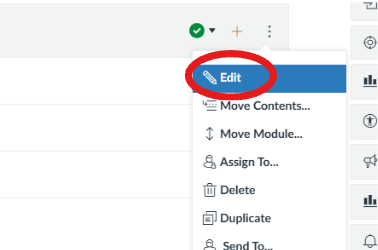
Note: You click the Edit button on the gray portion of the Modules, you’ll see Edit in whichever three-dots you click.
- On the right side you see Edit Module Setting. Here, you’ll be able to choose Complete All, where the student has to complete all requirements listed, the “List” are the activities, course materials, quizzes, etc. that is in that module. Then you’ll choose Students Must Move Through Requirements in Sequential Order or if you want them to Complete One activity.
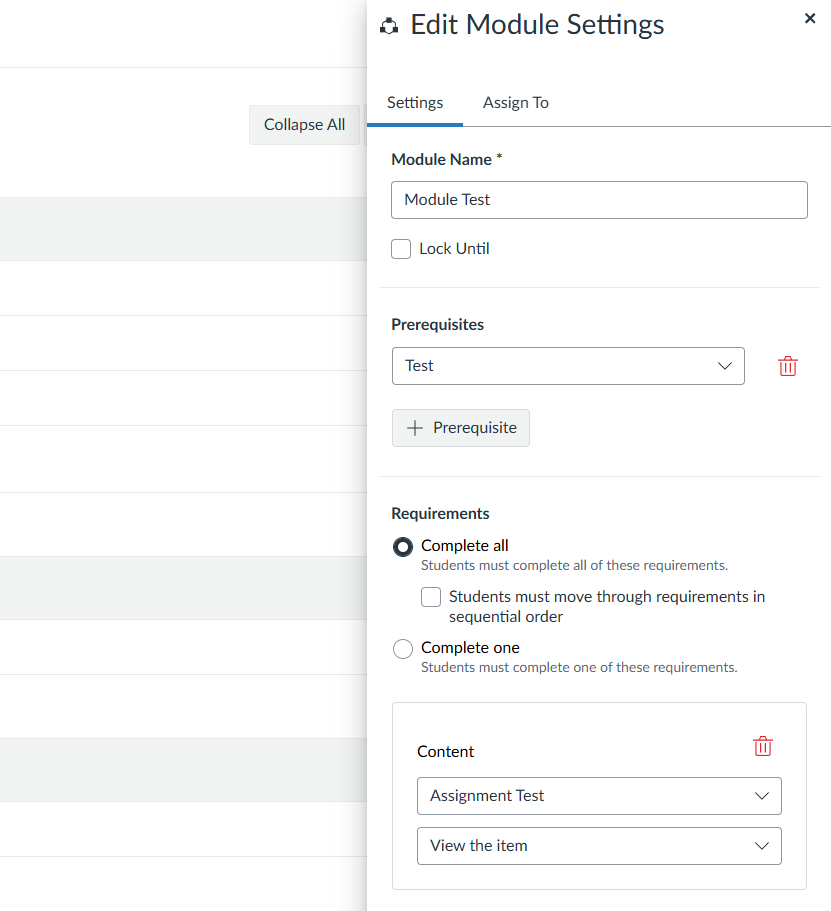
Note: If you pick Complete All, then you must add each module item as a requirement.
- Under Add Requirement, choose an item and the action required (“must view”, “must submit”).