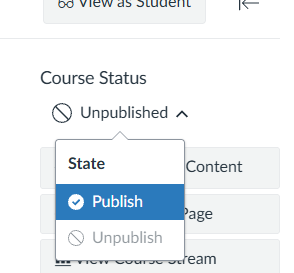
When you publish a course it makes it available for the students so they can access the content, assignments, grades, etc. There are two places that need to be published for everything to be opened to the students. You’d publish the actual content withing the modules then publish the entire course.
- Go to your course and click Home in the course navigation menu.
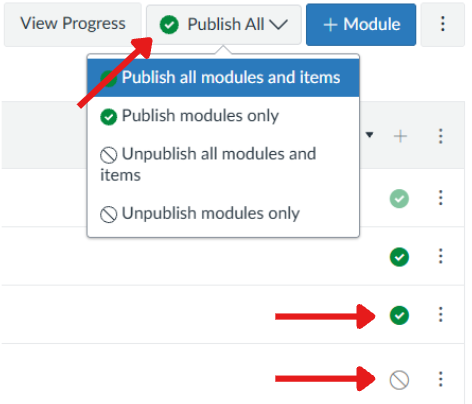
- Look for the circles with the slash through it on the right side of the module links. Or you can publish it by the drop-down box, and select Publish. The power of the green check!
- Click Publish. You can choose which items you want to publish or you can publish the whole module. If it has a gray circle, it’s unpublished, if it has a green checkmark it’s published.
Note: Once students have submitted work, avoid unpublishing the course, this can cause issues with grades and content visibility.
- On the top right you’ll see Course Status, this is where you publish the whole course to be visible for the students at the start of the semester.